|
🔀
JumpTask mode sends your Honeygain earnings to JumpTask as credits.
You can cash out from $0.50 instead of waiting for $20. You can switch back to Honeygain mode at any time.
|
⬢ Honeygain mode or JumpTask mode?
Both modes earn from the same bandwidth sharing. The difference is where your earnings go and how you cash out:
|
Honeygain mode |
JumpTask mode |
| Earnings go to |
Your Honeygain balance |
Your JumpTask account, as credits |
| Minimum payout |
$20 |
$0.50 (first payout $1) |
| Cash out as |
PayPal, or JumpTask credits |
Gift cards through GIFQ |
| 5% Honeygain mode boost |
Yes |
No |
Referral rewards also come from friends who earn in Honeygain mode. See how referrals work.
⬢ Turn on JumpTask mode
You can do this on the web Dashboard on any device, or in the Honeygain app on Android:
1 |
Open the mode switch
At the top of the Dashboard, tap the switch that shows Honeygain and change it to JumpTask.
|
2 |
Click Let's start!
You'll see the button in a pop-up.
|
3 |
Add your JumpTask Account ID
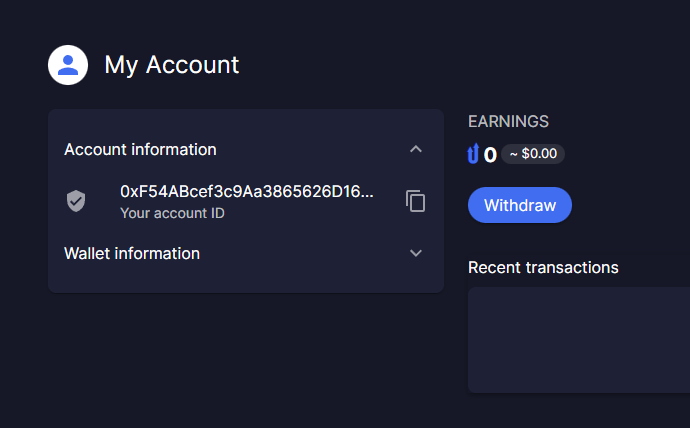
|
4 |
Enter the verification code
We send it to your Honeygain registration email.
|
5 |
Click Let's JumpTask
JumpTask mode is on. New earnings now go to your JumpTask account.
|
To switch back, use the same switch at the top of the Dashboard and choose Honeygain.
⬢ Related articles
Read more about earning in JumpTask mode.
What are JumpTask credits?Cash out through GIFQFind your JumpTask ID
|
